









In this article we will cover one of the most common WordPress errors: “Fatal error: Allowed memory size exhausted”. By the end of reading this article you will be able to understand what is causing this error and how you can fix it.
What is WordPress Memory Exhausted Error?
WordPress is a Content Management System written in PHP, which is a server-side programming language. Every website that is published on the Internet needs an appropriate WordPress Web Hosting account or server so that it functions properly.
Web hosting servers , like any other computer, they need memory in order to run multiple applications at the same time. By default, WordPress automatically attempts to increase PHP memory limit if that is less than 64MB. However, 64MB is often not high enough.
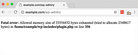
When your WordPress website is using plugins or themes that require more memory than the default allocated, the following error appears:
Fatal error: Allowed memory size of 33554432 bytes exhausted (tried to allocate 2348617 bytes) in /home/username/public_html/wp-includes/plugin.php on line xxx
How to Increase PHP Memory Limit in WordPress
The first step to increase PHP Memory limit in your WordPress website is to edit the wp-config.php file on your WordPress site. You can locate the file under your WordPress site’s root directory.
If you are not experienced or comfortable with using a shell editor like ‘nano’ or ‘vi’ then you will need to use an FTP client or File manager in your cPanel or Plesk control panel.
Open the wp-config.phpfile and paste the following code just before the line that says ‘That’s all, stop editing! Happy blogging.’
define( 'WP_MEMORY_LIMIT', '256M' );Save your changes and upload the updated wp-config.php file back to the same directory on your web hosting account / server.
Your WordPress website should now be working properly and the Memory Exhausted error should be gone.
I followed all the steps but i am still getting the same Memory Exhausted Error
The above solution has been tested with VPS and Dedicated Servers, as well as with NetShop ISP’s WordPress optimized web hosting accounts. The server environment from one web hosting provider to another differs, so if this solution does not work for you, you will need to contact your web hosting company to increase the PHP memory limit manually.
If you are a NetShop ISP Customer experiencing a Memory issue on your WordPress Website please contact our WordPress Hosting experts for help and to get the issue resolved.


